DM & Comment vs Comment Only
Two ways to engage your prospects — choose the one that fits your strategy.
When you create an automation, you choose how Lead Gravity interacts with people who comment on your post.
"DM & Comment" mode
This is the default and most used mode. Here's what happens when someone comments with your keyword:
1st degree connection
The person receives a DM with your resource + a public reply under their comment ("sent in DM!").
Not connected
Can't send a DM directly. Lead Gravity replies inviting them to connect, and retries the DM up to 2 times (+24h, +48h) in case they accept in the meantime.
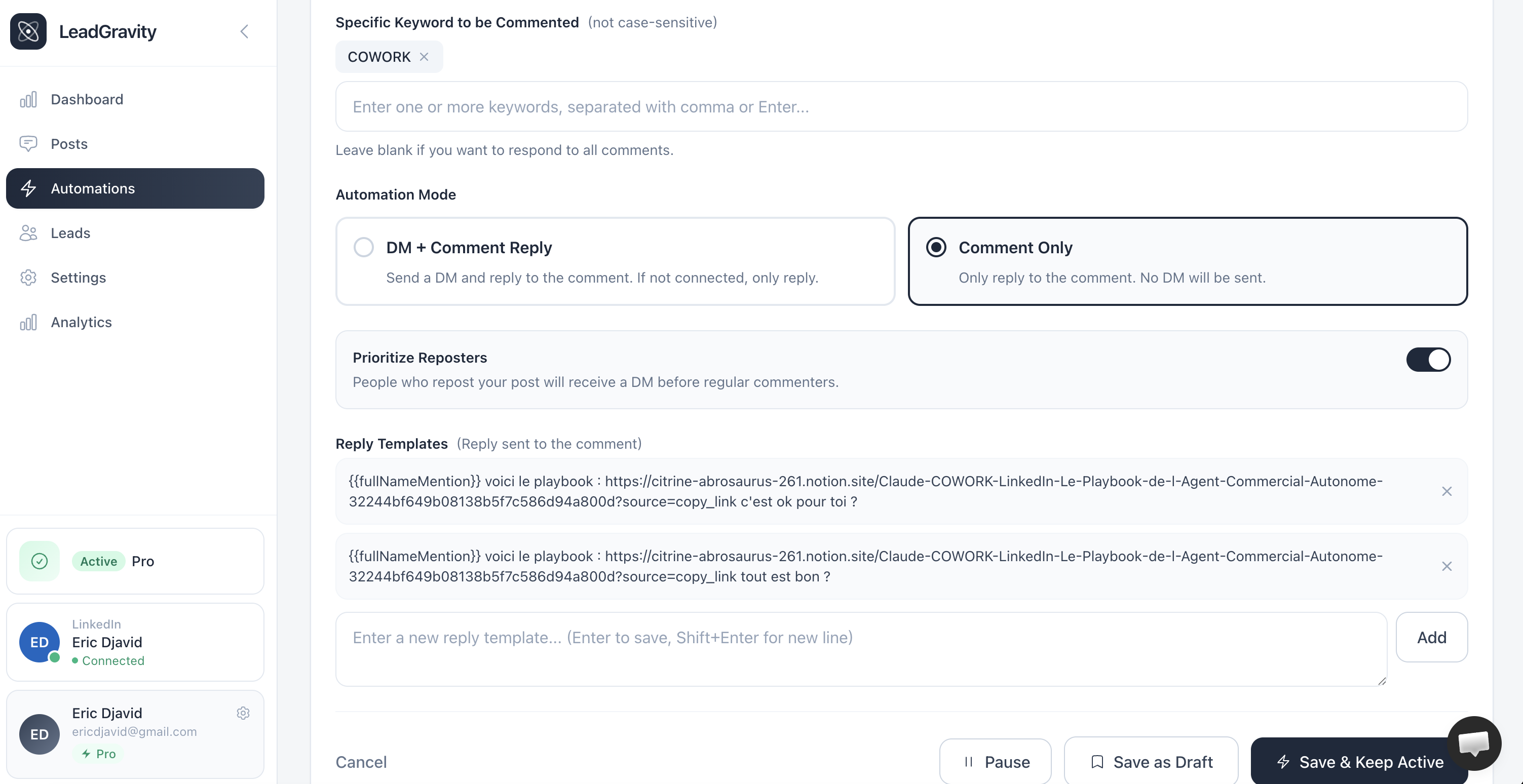
"Comment Only" mode
No DM is sent. Lead Gravity only replies as a comment, with the link to your resource included directly in the reply.
Use this mode when:
- Your resource is a public link accessible to everyone
- You want 100% transparent engagement
- You don't want to flood your LinkedIn inbox
Don't forget the link
In "Comment Only" mode, your reply template must contain the placeholder [ADD URL HERE] — that's where you paste your resource link.
Prioritize reposts
When this option is enabled (it is by default), people who repost your content are processed first. They receive your DM before regular commenters.
Makes sense: someone who reshares your content is more engaged than someone who just drops a comment.