Prioritize an automation: the flame button
When one of your posts goes viral, enable priority so its captures jump ahead of others in the send queue.
Small icon, big UX impact. You're running 5 automations in parallel and one of them catches a post that goes viral? Enable priority on it so its leads are sent before others'. Without touching your LinkedIn quotas or breaking the safe send cadence.
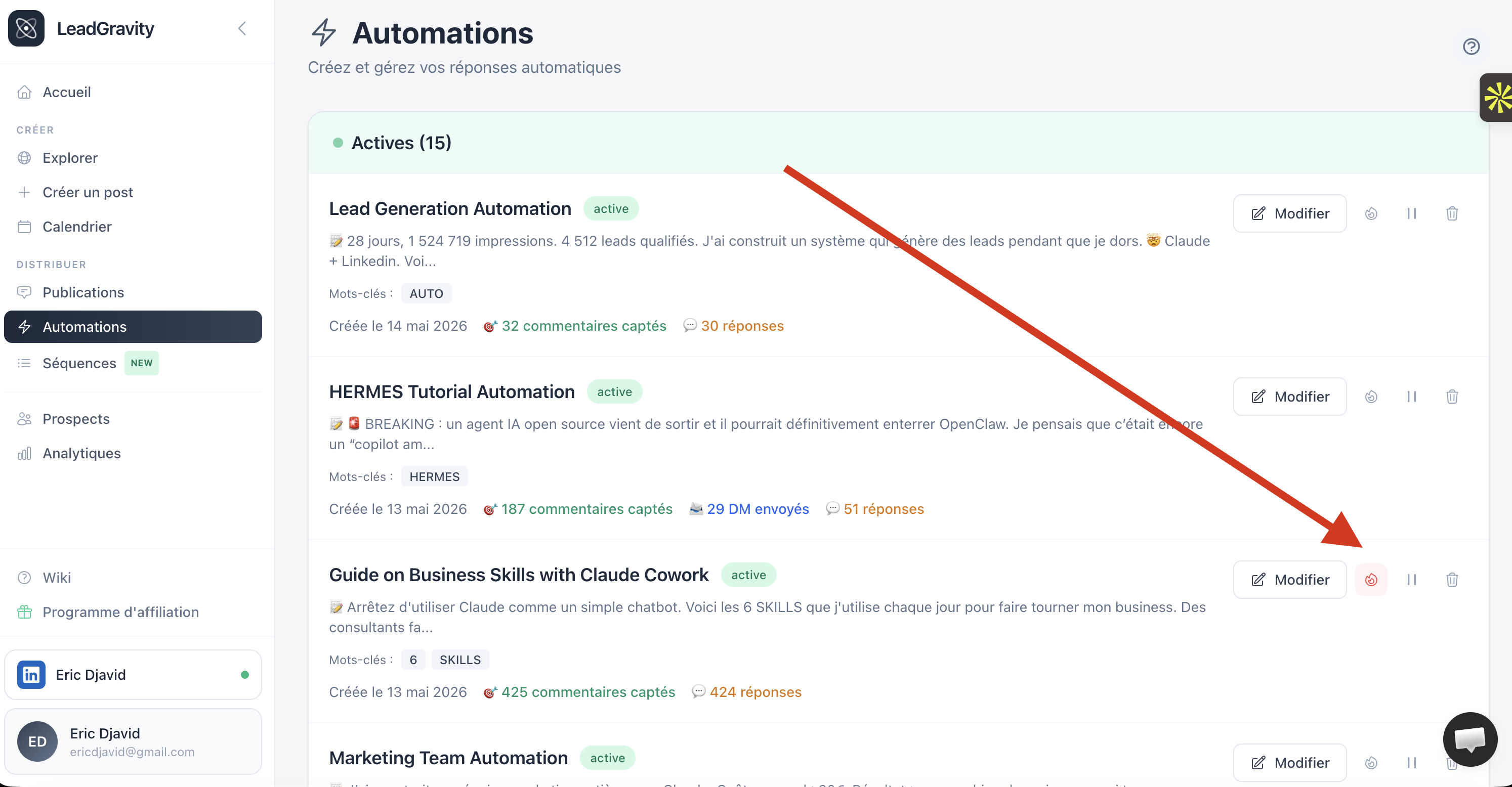
Where to find the button
On the Automations page (/dashboard/automations), each automation row shows a flame icon on the right, next to the play/pause button.
- Gray flame: priority disabled (default)
- Red flame on light background: priority enabled for this automation
One click toggles the state. You can boost as many automations as you want in parallel.
How it works under the hood
Lead Gravity sends DMs/replies in order priority DESC, scheduled_at ASC. In plain English:
- Captures from a boosted automation go first (priority = 1)
- Then captures from non-boosted automations (priority = 0)
- Within the same priority level, chronological order (FIFO)
The boost applies to new captures of the automation. Captures already in the send queue keep their initial priority (no retroactive reshuffle).
When to use it
Typical case: you have 4 automations running quietly (10-30 comments per day each). You publish a post on a sensitive topic that takes 300 comments in 2 hours. Your daily DM quotas would take 6+ days to handle those 300 new leads, and they'll have forgotten you by then.
Solution: enable the red flame on the automation of that viral post. All its new leads jump ahead of others in the queue. DMs go out on the viral first, leads are contacted while the post is fresh in their minds.
Other cases:
- An automation tied to a time-limited event (product launch, conference) that must finish before D+7
- A one-off partnership where response speed is differentiating
- An A/B test where you want fast ROI signal, not wait 2 weeks for the queue to drain
Impact on other automations
When an automation is boosted, others aren't blocked, just temporarily held back. Once the boosted automation's queue drains (or you disable the flame), others resume their normal FIFO turn.
Your daily LinkedIn quotas stay identical (DMs 50/day, replies 300/day by default). The boost only reorders the send order within those quotas, doesn't increase volume.
Best practices
- Targeted boost. If all your automations are boosted, none of them are. Priority makes sense on 1 or 2 automations max.
- Disable as soon as priority no longer matters. Once your viral is handled (for example), disable the flame to restore normal FIFO order for others.
- Compatible with all configs. Works in "DM + Comment" and "Comment Only" modes, with or without a sequence wired in.
The boost is included in all subscriptions (free trial, Starter, Pro, Pro Max). No cap, no feature gating.