Aspirate the commenters of a LinkedIn post
Paste a viral post URL, we aspirate all its commenters and enroll them in your outreach sequence. Without you posting anything.
The most direct conversion lever in Lead Gravity: you spot a viral post (a competitor, an influencer in your niche, whatever), paste its URL, and all its commenters get aspirated in seconds and enrolled in your sequence. No need to wait for one of your own posts to capture leads.
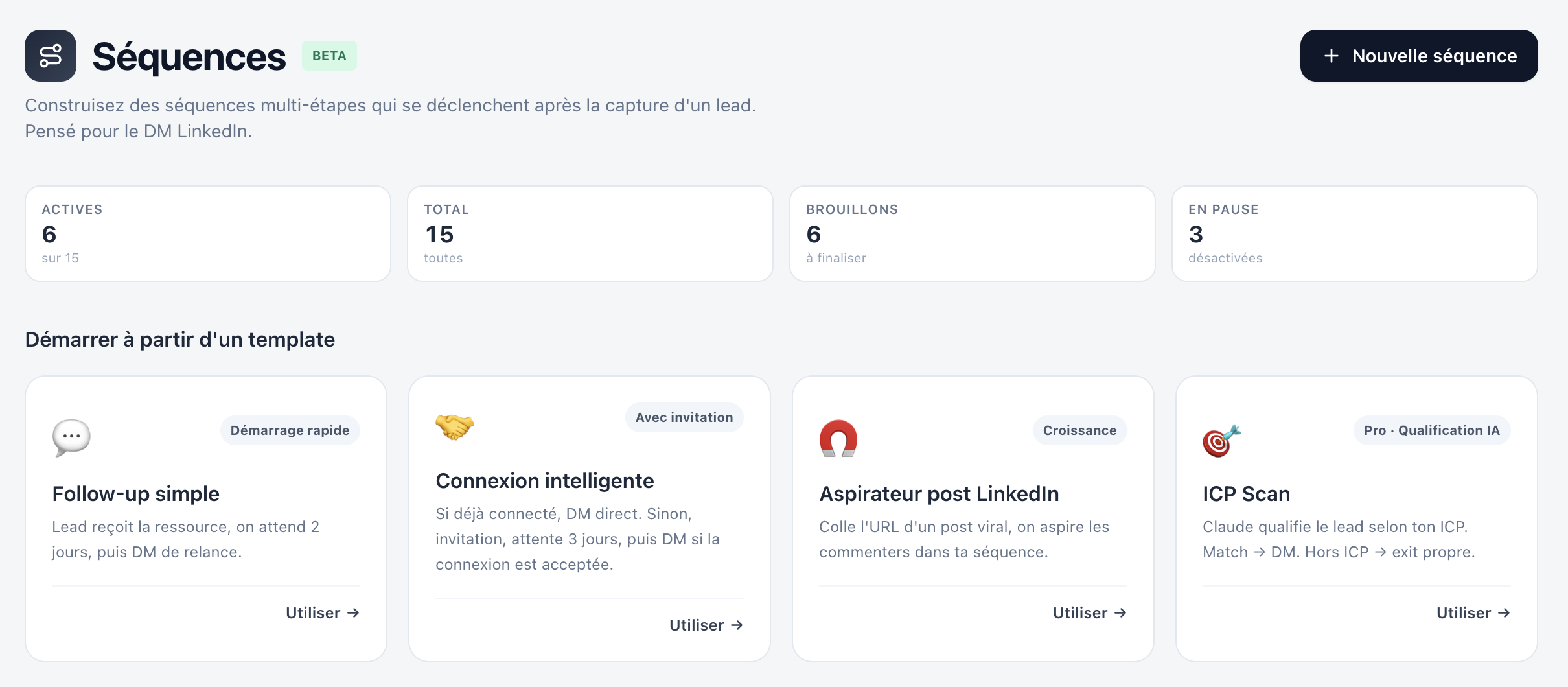
How to start an aspiration
On the Sequences page, click "New sequence" then pick the 🧲 LinkedIn post aspirator template.
You land in the sequence editor. Click the "Lead captured" node at the top to open the right-hand inspector, then paste the URL of the LinkedIn post you want to aspirate into the "LinkedIn post URL" field.
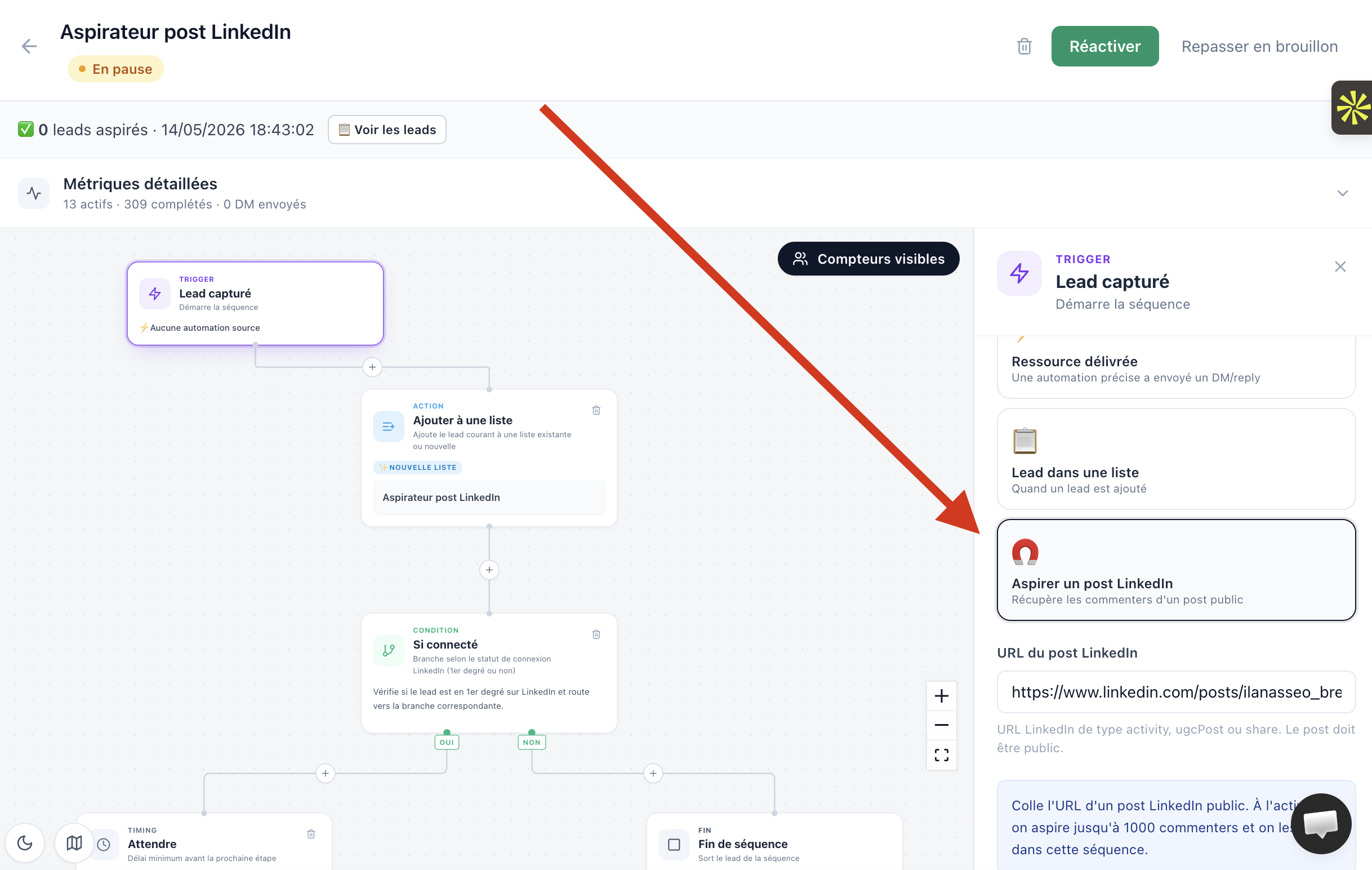
Accepted URL formats:
https://www.linkedin.com/feed/update/urn:li:activity:XXXXhttps://www.linkedin.com/posts/...-share-XXXX- Any URL containing
activity,ugcPostorsharefollowed by a numeric id
The post must be public. If Lead Gravity can't access it, a clear error message appears in the status banner after activation.
Configure the DM sent to commenters
Click the "Send a DM" node in the graph. The default template is intentionally engaging and contextual:
I saw your comment on the post and it struck me we share the same interests.
Curious: what made you engage with it?
Customize as you wish. The {{firstName}} variable is replaced with the commenter's first name at send time.
Filter LinkedIn connections with "If connected"
The template includes an "If connected" node by default between the "Add to a list" node and the DM. It checks whether the commenter is already your 1st-degree LinkedIn connection:
- YES branch: you can DM directly → 2-day delay → send DM
- NO branch: clean exit (reason "Lead not connected"). Customize to send an invitation instead
This avoids spamming LinkedIn invitations to people who aren't connected yet and keeps your sends within a safe pattern.
Activate the sequence
When your URL is pasted and your DM is ready, click "Activate" at the top right. Aspiration starts immediately.
A pulsing blue banner appears: "🧲 Aspirating commenters... Please don't close the page, this takes 5 to 30 seconds depending on the post size."
A persistent toast notification also shows in the top-right until aspiration completes.
When done, the banner turns green: "✅ X leads aspirated" with a "See leads" button that takes you straight to the list where they were added.
View aspirated leads
Lead Gravity automatically creates a lead list named after your sequence. All aspirated commenters are added to it (no duplicates, idempotent).
If a list with this name already exists, it's reused (case-insensitive). Combined with several aspirator sequences sharing the same name, you can pool leads into one list.
You can edit the "Add to a list" node to switch to "Existing list" mode and target a different list of your choice.
Track progression in the sequence
Once aspirated, leads are enrolled in the sequence and progress through the graph step by step, automatically (every 2 minutes). On the canvas, bubbles with lead counts appear on each node to show where each one is.
Default delay between aspiration and DM send: 2 days during business hours. Configurable in the "Wait" node.
Re-aspirate a post to catch new commenters
A viral post keeps getting comments hours or days after publishing. To re-aspirate and catch new commenters:
On the sequence page, to the right of the green status banner, click "Re-aspirate this post". Aspiration runs again, already-captured commenters are skipped (idempotent), only new ones are enrolled.
Limits and best practices
- 1 000 commenters maximum per aspiration (MVP cap). Covers 95% of posts. For virals with more than 1000 comments, contact support to enable extended mode.
- The post must be public. If it's private or deleted, aspiration fails with a readable error message.
- LinkedIn quotas respected. DMs go out at the safe pace of the sequence (spacing, business hours, daily quotas). 200 aspirated leads ≠ 200 instant DMs.
- ICP coupling recommended. Add an "ICP Filter" node before the DM to only contact leads matching your ideal customer. Avoids off-target exits and protects your LinkedIn reputation.
Ideal use case
A competitor publishes a post with 300 comments on "The best LinkedIn prospecting tools". You create an aspirator sequence with that post + a personalized DM: "Hello {{firstName}}, I saw your comment — happy with your current stack or looking for better?". In 15 seconds, 300 warm leads are enrolled in your sequence. With an ICP filter "Founders and VP Sales B2B SaaS", you keep only the 80 most relevant ones. DMs sent over 4 days. Typical response rate: 15 to 30%.